Spike Points in Detail
(This is a continuation of a separate article.
Please read that before continuing.)
In this article we’ll look more closely at spike points and what
surrounds them. We’ll begin by examining their width. But
before doing so, let’s first look at the width of regular kill points.
Width of regular kill points
The width of a regular kill point is based on the width of the
partitions surrounding it. The half-width of a kill point is
determined from this constant:
KPhw = 0.0000000807819
This represents a fraction of a partition. We multiply this by
the width of a partition to determine the width of the kill point on
that partition. We then do the same in the partition on the
opposite side.
Example
Take the kill point at 4.967415942846243. The distance to the
peak immediately above it is 0.003258512124971 semitones. We
multiply this by the KPhw fraction and get the following:
0.003258512124971*0.0000000807819 = 0.000000000263229
So the upper limit on the kill point is:
4.967415942846243+0.000000000263229 = 4.967415943109472
The distance to the peak immediately below it is 0.004242509462579
semitones. Multiplying that by KPhw gives:
0.004242509462579*0.0000000807819 = 0.000000000342718
So the lower limit on the kill point is:
4.967415942846243-0.000000000342718 = 4.967415942503525
Therefore the kill point is active within the range:
4.967415942503525 to 4.967415943109472
Immediately outside of that range there is no ‘killing’. This
kill point has a width of 0.6059 billionths of a semitone and is the
widest available. The average kill point width is 0.0026
billionths of a semitone.
Width of spike points
The width of a spike kill point is not based on the partitions
surrounding it but on its location. To determine its width, the
first step is to multiply its numerical value by 2^25, i.e.
33554432. This leaves us with an integer followed by a
fraction. We take note of whether the integer is even or odd,
then subtract it. This leaves us with a fraction between 0 and 1.
Example
Take the spike point at 4.837732654004006. Multiply it by 2^25
and get:
4.837732654004006*33554432 = 162327371.372956947054592
The leading integer, 162327371, is an odd number. Subtract that
and get the fraction 0.372956947054592.
With that fraction we need to look up some tables. There are two
tables, an even and odd table as follows.
Even table
| Index | From | To |
| 0 | -1999889 | 2999889 |
| 1 | -498896 | 488896 |
| 2 | -199889 | 198889 |
| 3 | -189888 | 199888 |
| 4 | -478896 | 489896 |
| 5 | -88896 | 89896 |
| 6 | -98896 | 99896 |
| 7 | -8896 | 9896 |
| 8 | -97896 | 98896 |
| 9 | -189889 | 188889 |
| 10 | -197896 | 198896 |
| 11 | -99888 | 199888 |
| 12 | -887896 | 888896 |
| 13 | -98889 | 99889 |
| 14 | -897896 | 898896 |
| 15 | -198896 | 197896 |
| 16 | -197896 | 197896 |
(Table 1A)
Odd table
| Index | From | To |
| 0 | -888896 | 889896 |
| 1 | -488896 | 498896 |
| 2 | -1888889 | 1888889 |
| 3 | -988896 | 988896 |
| 4 | -199896 | 197896 |
| 5 | -497889 | 498889 |
| 6 | -188896 | 189896 |
| 7 | -478889 | 479889 |
| 8 | -98896 | 97896 |
| 9 | -2898889 | 2898889 |
| 10 | -488889 | 498889 |
| 11 | -199896 | 489896 |
| 12 | -98896 | 99896 |
| 13 | -2978896 | 2988896 |
| 14 | -1979889 | 1989889 |
| 15 | -198896 | 1778896 |
| 16 | -98896 | 189896 |
(Table 1B)
The tables each have 17 rows, and each row has a fraction range.
They’re used as follows:
- If the fraction is less than 0.004801, use index=0.
- Else, if the fraction is less than 0.070902, use index=1.
- Else, subtract 0.070877 from the fraction, multiply by 16,
take the integer portion of the result, and add 2 to
determine the index.
- With that index value, look up the corresponding From and
To ranges in the appropriate even/odd table.
- Divide each of those range numbers by 10^15.
- Add the range numbers to the spike point note. This
gives the spike activation range.
Example
Following from the earlier example, 0.372956947054592 is above
0.070902. So we subtract 0.070877 to get
0.372956947054592-0.070877 = 0.302079947054592. Multiply that by
16 to get 0.302079947054592*16 = 4.833279152873472. Take the
leading integer, which is 4, then add 2, giving 6.
Looking up entry 6 in the odd table, gives the From/To range:
-188896 to 189896
Divide both by 10^15 to get:
-0.000000000188896 to 0.000000000189896
Thus the spike point activation range is:
4.837732654004006-0.000000000188896 = 4.83773265381511
to
4.837732654004006+0.000000000189896 = 4.837732654193902
There are some special cases corresponding to a fraction value of
zero. Their range values are:
| Note | From | To |
| 1.2733154296875 | -1788888 | 1789888 |
| 2.25 | -99889 | 88889 |
| 2.546630859375 | -99896 | 98896 |
| 2.7421875 | -898889 | 888889 |
| 2.681671142578125 | -988896 | 989896 |
| 3.2578125 | -197896 | 197896 |
| 4.5 | -99889 | 88889 |
(Table 2)
Check for these special cases before using the general method.
Interactive App
To assist with this, an interactive application is provided:
Calculate Spike Point Widths
(opens in new tab)
This takes a note value as input and follows the above method to
determine the range. Calculation steps will be shown. The
JavaScript can be viewed and followed in debug mode to see how the
calculations are done.
Long-duration spike points
Each partition that contains spike points also contains 19 additional
spike points. The location of these points is based on fractional
positions of the partition. The fractions are:
| Fraction | Width |
| 7/180 | 1 |
| 7/90 | 2 |
| 7/60 | 3 |
| 7/45 | 4 |
| 7/36 | 5 |
| 7/30 | 6 |
| 49/180 | 7 |
| 14/45 | 8 |
| 7/20 | 9 |
| 7/18 | 1 |
| 7/15 | 3 |
| 49/90 | 5 |
| 7/12 | 6 |
| 28/45 | 7 |
| 7/10 | 9 |
| 7/9 | 2 |
| 49/60 | 3 |
| 14/15 | 6 |
| 35/36 | 7 |
(Table 3)
This first column represents the starting positions of the spike
points. The second column represents the width and needs to be
divided by 900000.
Example
Take the partition beginning at 4.834236543846192. It has width
of 0.004419048603684. Choose the fraction of 28/45 from the above
table. Now multiply that by the partition width and add it to the
partition start:
4.834236543846192+0.004419048603684*28/45 = 4.8369861740884845
The width corresponding to 28/45 is 7. We divide that by 900000,
multiply it by the partition width, and add it to the spike point start:
4.8369861740884845+0.004419048603684*7/900000 = 4.836986208458862
Thus the spike point runs from:
4.8369861740884845 to 4.836986208458862
In reality the starting point is slightly different. It is
4.836986174088828. The reason for this is that calculations are
based on a 10-digit decimal fraction and the last digit of this
fraction can increase or decrease by 1. To see these fractions,
open the accompanying app,
view its source, and search for the array LDspikespan
An important aspect of these spike points is that their activation
period extends for four buffer lengths rather than three. For
this reason they can be called ‘long duration spike points’. This
means that if such a note is played it will take around 28.6 seconds
before its impact is removed.
For example, take the notes 0 and 5.82005, for which 0 is a strong
base. Alternate between them to confirm this. Now briefly
play the note 4.83698619, which is a mid-point from the previous
example. Now alternate between 0 and 5.82005 and notice neither
is base. After 29 seconds, 0 will go back to being base.
Energy levels in spike partition
The energy value of a note normally rises smoothly from zero to one
when going from a kill or zero point to a nearby peak, with an energy
magnitude equal to its fractional position. But this is not the
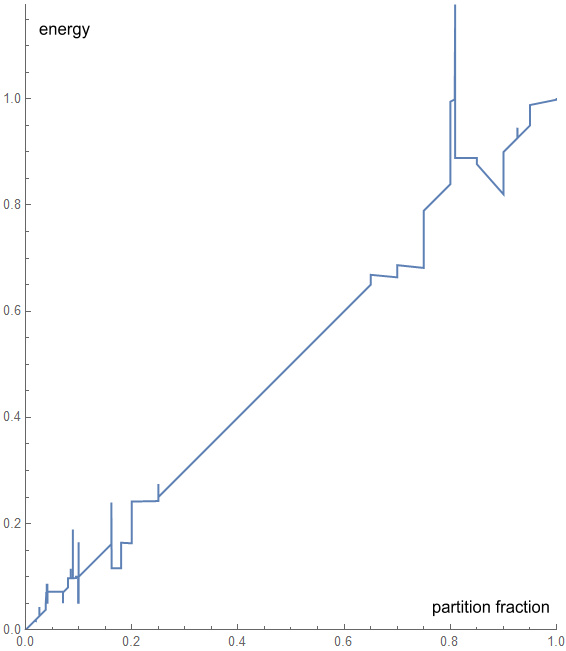
case when a partition contains spike points. Instead, the energy
chart is jagged like this:
(Chart 1)
As can be seen, the line has sudden jumps. These jumps occur at
fixed positions of one hundred-thousandths of the overall width, i.e.
in multiples of 0.00001. And when the jumps occur, the energy
will be in these same multiples. To see the exact positions and
values, open the accompanying app,
view its source, and search for the array cvtspikengy
Over-unity notes
Of particular interest here is a section where the energy goes above
1. I call these ‘over-unity notes’. The highest over-unity
note on the above chart occurs at fractional position 0.809 and has an
energy value of 1.17772. To hear what this sounds like, try
comparing note 4.8378115541665725 with note 0. The comparison
reveals note 0 is more strongly base than normal. For reference,
a nearby note with energy of 1 is 4.838655592449876.
There are also over-unity notes of higher energy. One of the
highest found occurs at fractional position 0.41301409488. It has
an energy of 1.99989. An example of this is note
4.836061673205495. Comparing that to note 0 makes note 0 a very
strong base. These ‘super over-unity’ notes occur within very
narrow regions – in this example, less than a trillionth of a semitone.
To hear some other examples, open the Sine Wave Piano app:
Sine Wave Piano
In the Temperament section are several tuning methods. Start with
the default Equal setting and alternate between notes C and E (using
computer keys A and D). In this setting, note E has an energy of
0.1069 and note C will sound as a weak base.
Next select the Stronger option and alternate between C and E. In
this setting, note E has an energy of 1, so note C will sound as a
stronger base.
Next select the Over Unity+ option and alternate between C and E.
In this setting, note E has an energy of 1.99989, so note C will sound
as a very strong base.
The Over Unity- option does the opposite and makes E the base.
But before playing other over-unity notes, either wait 29 seconds or
change the Offset slightly, otherwise the notes will sound flat – see
the following paragraphs.
There are several important points about how over-unity notes are affected
by kill points. The first is that both regular kill points and spike
points will kill an over-unity note for four buffer lengths, i.e. for
around 29 seconds.
The second is that over-unity notes will kill other over-unity notes
for the same four buffer lengths. That means if two such notes
are playing within a 29 second period, some flattening will occur.
The third is that a long-duration spike point will kill an over-unity
note for five buffer lengths, i.e. for around 35.7 seconds.
Measuring the energy
Determining the energy of a note can be done by comparing it to a note
of known energy.
First select a partition that has spike points. The widest runs
from the kill point 4.834236543846192 to the peak
4.838655592449876. Define Nx as a note between those two notes as
follows:
Nx = 4.834236543846192*(1-x) + 4.838655592449876*x
Where x is a fractional position between the kill point and peak.
When x=0, it is at the kill point, and when x=1, it is at the peak.
Next choose a partition that has no spike points. The widest with
positive energy values runs backward from 4.867043954698947 to
4.866679973393758. Define Ny as a note between those two notes as
follows:
Ny = 4.867043954698947*(1-y) + 4.866679973393758*y
Where y is a fractional position between the kill point and peak.
Since this partition has no spike points, the value of y will also
equal the energy of Ny.
Next choose a note that has note 0 as a strong base. We can
choose 5.82005 and call this note H. H has an energy of 0.89.
To determine the energy of Nx, do the following:
- Choose a value of y to test against. We can
start by setting y=x.
- Play 12-Nx for 70ms (milliseconds). Where
12-Nx is the note reflected into the upper half-octave. 65ms is
required to activate a note so we use a slightly longer time.
- Allow 7200ms of silence. This will push
12-Nx into the secondary buffer.
- Play 12-Ny for 70ms. 12-Ny will be in the
primary buffer.
- Alternate between 0 and H to determine which is
base. Do this within 7 seconds.
- If 0 is base, increase the value of y and return
to step 2.
- If H is base, decrease the value of y and return
to step 2.
- If 0 and H are equal, we now know the energy of Nx
is y.
Steps 6 and 7 should ideally be done using the ‘binary search’ method
as that will quickly narrow down the target.
How do we measure the energy of a note when the energy is higher than
1? This appears difficult because we don’t have any energies>1
in a non-spike partition. The problem can be solved by noticing
the energy comparison in the secondary buffer looks at the average
of note energies. So we also play note 0, which has energy of
zero, and this halves the energy of the Nx note, as follows:
- Choose a value of y to test against. We can
start by setting y=x.
- Play note 0 for 70ms.
- Play 12-Nx for 70ms.
- Allow 7200ms of silence. This will push
notes 0 and 12-Nx into the secondary buffer.
- Play 12-Ny for 70ms. 12-Ny will be in the
primary buffer.
- Alternate between 0 and H to determine which is
base. Do this within 7 seconds.
- If 0 is base, increase the value of y and return
to step 3.
- If H is base, decrease the value of y and return
to step 3.
- If 0 and H are equal, we now know the energy of
(0+Nx)/2 is y.
The result is that the energy of Nx is 2*y.
For example, if we set x=0.809, we will find y=0.58886. This
means the energy of Nx is 2*0.58886 = 1.17772.
Measuring the energy in reverse
An interesting thing happens when we reverse the above energy measuring
process. That is, instead of playing 12-Nx (a note from the spike
partition) followed by 12-Ny (a note from the non-spike partition); we
instead play 12-Ny then 12-Nx.
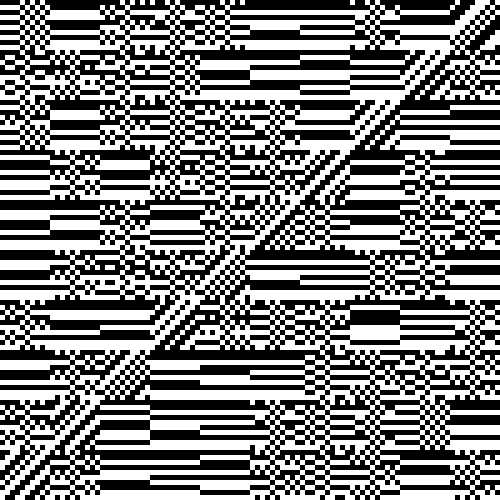
When we do it in this manner, instead of finding a single value where
the two energies are equal, we instead find thousands of matching
values. The locations are best represented by this chart:
(Chart 2)
What we are seeing here is a tiny corner of a much larger chart.
The x-axis (along the bottom) represents the fractional positions
within a spike-point partition, from 0.00000 to 0.00099. I.e. the
first 100 of 10,000 positions spaced at 0.00001.
The y-axis is likewise spaced at 0.00001 intervals and represents the
energy measured in a non-spike-point partition. When the ‘pixel’
at a given x/y coordinate is white, the energies are matched.
When it is black, they are mismatched.
This chart repeats itself 100 times along both axes. That is, the
first three digits of the five-digit fraction make no difference to the
outcome.
There are many fascinating pattens here. We can see a broader
pattern of 10x10 large squares, represented by this table:
S H S S S H H S
H D
S S S S H H H H
D S
S H S S S S H D
H H
H S H S S S D H
S H
H H S H S D S H
S S
H S S S D H H S
S H
S H H D S S S H
H S
H S D H H H S S
S S
S D H H H S S S
S H
D S H H H S S S
H S
(Table 4)
Here, D contains diagonals, predominantly with white pixels on the
locations where x=y.
H contains horizonal lines with each 1x10 column having the same
pattern.
S contains ‘speckled’ patterns.
There are 5 S’s and 4 H’s in each row and column.
Within each 10x10 square, each column contains 5 white and 5 black
pixels, with no more than 3 of the same type in sequence. In the
‘speckled’ (S) squares, the 5th and 6th columns have a checkerboard
pattern that is based on whether the S square has an even or odd
horizonal location in Table 4.
The origin of these intricate patterns is unknown. But it’s
likely that they repeat themselves in some manner elsewhere in our
hearing.
|